
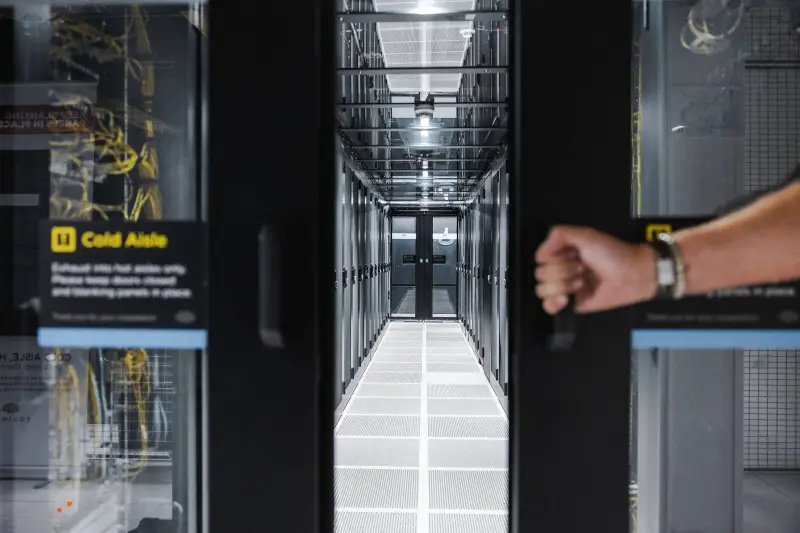
Physical security of data centers: a comprehensive guide for CIOs

The physical security of a data center is not just a line in an SLA that no one reads, nor is it a box to check off in your disaster recovery plan. It is your legal responsibility, your GDPR compliance, and potentially your reputation at stake. Yet few CIOs have actually visited the site where their critical data resides, or know exactly who has access to it.
I. The Fundamentals of Physical Security
1. Physical access and identity checks
When choosing a data center, the first question to ask yourself is simple: who can physically access my servers? The answer should be: very few people, and only with complete traceability
Serious access control is not limited to a badge. High-quality data centers implement multi-factor authentication: encrypted RFID badges, biometrics (fingerprint or facial recognition), and PIN codes. This combination ensures that a lost or stolen badge is not enough to compromise your equipment.
Key point: Every access must be logged: who entered, when, in which area, and for how long. These logs are not just an administrative formality. In the event of an incident, they are your only objective evidence. During your audit, ask to see these logs and check that they go back at least 90 days.
The principle of cascading zones is crucial: entering the building does not give access to the server rooms. Each successive zone requires a higher level of authorization. Your network technician must be able to access your cage, but not your neighbor's. This segmentation naturally limits the damage in the event of a compromise.
Finally, insist on mandatory accompaniment for all visitors, including yourself during your first visits. If a service provider allows you to move around freely “because you are a customer,” this is a red flag. This rule protects everyone, including you.
2. Physical separation and compartmentalization
In a shared office space, you share a building with other clients. The key question becomes: how can you ensure that they cannot access your equipment, either accidentally or intentionally?
The answer starts with individual cages with full-height mesh walls, from floor to ceiling. These cages are non-negotiable. They prevent visual and physical access to your equipment. You must have your own locking system, separate from the general access control. If your “cage” is simply marked out by strips on the floor or half-walls, be aware of the risks.
If you host sensitive data (health, finance, personal data under GDPR), some data centers offer high-security zones with enhanced controls. These zones are more expensive, but they may be mandatory for regulatory compliance. Check whether your business requires this level of separation.
An often neglected point: cable trays. Your network cables should not be accessible from outside your cage. An attacker should not be able to connect a listening device to your infrastructure simply by lifting a shared drop ceiling panel.
3. Surveillance and intrusion detection
You can't be on site 24/7. Continuous monitoring is therefore your assurance that no one will interfere with your equipment in your absence.
Surveillance cameras should cover all angles: entrances, walkways, and especially your building. If possible, ask to check the image quality and verify the retention period for recordings (minimum 90 days). These videos must be accessible upon request in the event of an incident.
A point that is rarely checked: event correlation. A mature data center analyzes failed access attempts. Three attempts with an invalid badge on your cage at 3 a.m., followed by a suspicious network connection attempt? This pattern should trigger an investigation. Ask if the data center has a Security Operations Center (SOC) that cross-references this data.
Surveillance is not limited to intrusions. Doors left open too long, unusually long periods of inactivity, or repeated access outside your usual hours are all weak signals that a mature system must report.
II. Critical Infrastructure Protection
1. Protection against environmental risks
Your servers may survive a cyberattack, but not a fire or flood. Yet environmental risks are often overlooked when choosing a data center. This is a mistake.
Fire
Early detection makes all the difference. A data center must have aspirating smoke detectors (VESDA) capable of identifying the onset of a fire even before flames appear. These systems continuously draw in ambient air and detect combustion particles invisible to the naked eye. Conventional smoke detection comes too late.
Flood
The location of the data center is extremely important. Verify that the site is not in a flood zone (consult the risk prevention plans for your region).
Internal leaks are an underestimated risk. Cooling systems circulate large volumes of water. Leak detectors on the floor, under cable trays, and near air conditioning equipment must trigger an immediate alert.
Temperature and humidity
An overheating server is a server that shuts down. Data centers typically maintain a temperature between 18°C and 27°C with a relative humidity of 40-60%.
An N+1 air conditioning system means that there is a backup cooling unit. If one unit fails, the others take over without any impact. Tier III and IV data centers go further with 2N (full redundancy) configurations.
2. Power supply and redundancy
Even a power outage lasting just a few seconds can corrupt databases and cause data loss. The power supply to a data center must be considered critical, with multiple levels of protection.
Uninterruptible power supplies (UPS) are the first line of defense against micro-outages and voltage fluctuations. They take over instantly, without any interruption to your equipment.
UPS autonomy is generally 10 to 15 minutes. That's not much, but it's enough to start up the generators. If the UPS fails or reaches the end of its life, your servers will shut down abruptly during the next power outage.
Questions to ask: When were the UPS units installed? What is their expected lifespan? An aging UPS loses capacity. A reputable data center tests them regularly and replaces them before they become a point of failure.
The generators take over if the power outage lasts. They must start automatically in less than 10 seconds and have sufficient fuel reserves to last several days. A single generator is not enough: the N+1 configuration (at a minimum) ensures that a generator failure does not affect the power supply.
Regular testing: Generators should be tested monthly under actual load, not just during cold starts. A generator that starts up does not guarantee that it will hold up under load.
3. DRP, BCP, and crisis management
A Disaster Recovery Plan (DRP) and a Business Continuity Plan (BCP) are not theoretical documents. They are operational procedures that define how the data center responds in the event of a major incident.
The DRP describes how to restore services after a total outage. The BCP defines how to maintain critical services even in degraded mode. The two are complementary.
Key question: Are these plans tested regularly? A disaster recovery plan that has never been tested is as useful as a parachute that has never been opened. Ask when the last full-scale test took place and what the results were.
Crisis communication is often overlooked. In the event of an incident, you need to be informed quickly with accurate information. The data center must have clear procedures in place: who contacts you, through which channel, and how often updates are provided. An incident handled in a non-transparent manner is always worse than a transparent incident.
Finally, degraded procedures define how the data center operates when everything is not running perfectly. If the main air conditioning system fails but the backup is working, what are the limitations? If a generator is undergoing maintenance, what happens in the event of an electrical incident? These situations are not major incidents, but they reduce your resilience. You need to be aware of them.
III. Compliance and certification
1. Standards and certifications
Certifications are not just a logo on a website. They are objective proof that the data center complies with recognized standards. But not all certifications are equal, and some are more about marketing than real security.
ISO 27001
ISO 27001 is the international standard for information security management. An ISO 27001-certified data center has implemented a security management system (SMS) covering organizational, technical, and physical aspects. This certification involves an annual audit by an independent body. But beware: ISO 27001 certifies a process, not a result. A data center can be certified and still have vulnerabilities if the process is poorly implemented.
Ask to see the full certificate with its scope. Some data centers only certify their headquarters or a single site, then advertise “our ISO 27001 certification” to suggest that all their sites are covered. Check that the site you are interested in is explicitly included in the scope.
SOC 2
SOC 2 (Service Organization Control 2) is a widely used American standard in the tech industry. A SOC 2 Type II report evaluates the internal controls of the data center over a given period (usually 12 months). It covers five criteria: security, availability, processing integrity, confidentiality, and privacy. It is a demanding certification that involves a thorough audit.
The full SOC 2 report is often several hundred pages long. Data centers do not usually make it publicly available, but you can request it under an NDA. If a data center refuses to share its SOC 2 report with a potential customer, this is a red flag.
PCI-DSS
PCI-DSS (Payment Card Industry Data Security Standard) is mandatory if you process credit card payments. It is a set of requirements covering network security, data protection, access control, and monitoring. PCI-DSS certification of the data center does not exempt you from your own compliance, but it greatly facilitates audits.
There are four PCI-DSS levels depending on transaction volume. A PCI-DSS Level 1 certified data center (the most stringent) demonstrates a high level of security. But check the date of the last certification: PCI-DSS must be renewed annually.
Tier III/IV
Tier III/IV from the Uptime Institute is the global benchmark for classifying data centers in terms of availability and redundancy. Tier III and IV involve physical audits of the site, not just a review of documentation.
Be careful of “Tier-ready” or “designed to Tier X” claims: these are not official certifications from the Uptime Institute. A data center may be designed according to Tier III specifications but never have been audited. Official certification is expensive and time-consuming, which explains why some providers choose not to pursue it.
Regular audits: Audits are as important as the certifications themselves. ISO 27001 requires an annual surveillance audit. SOC 2 Type II covers a 12-month period. These audits are not mere formalities: they verify that controls are still in place and effective. Ask for the dates of the most recent audits and their results.
2. Geographic location and risks
The location of a data center directly influences its resilience to natural and geopolitical risks. This is a criterion that is often overlooked, but one that can have dramatic consequences.
Natural hazards
Natural risks vary greatly depending on the region. In France, flood zones are mapped in Flood Risk Prevention Plans (PPRI). A data center in a red flood zone is an aberration, regardless of the quality of its internal protections. Consult these maps before signing anything.
Seismic risks are less prevalent in mainland France than in Japan or California, but they do exist. The Pyrenees, the Alps, and Alsace are subject to moderate seismic risk. A data center in these areas must be built to reinforced earthquake-resistant standards. Ask whether the building has been designed to withstand an earthquake, and of what magnitude.
Climate risks
Climate risks are evolving with climate change. Repeated heat waves pose a major problem for data center cooling. During the heat waves of 2019, 2023, and 2025, several French data centers had to limit their customers' loads or activate emergency procedures. A well-designed data center must be able to maintain its operating temperatures even during a prolonged heat wave.
Violent storms, which are becoming increasingly frequent, can damage electrical infrastructure. An exposed data center must have reinforced protection: lightning rods, surge protection equipment, and underground rather than overhead power supply.
Legal constraints and GDPR compliance
Legal constraints vary from country to country. The location of your data determines the applicable jurisdiction and the authorities that may request access. A data center in the United States is subject to the Cloud Act, which allows U.S. authorities to request access to data even if it is physically located outside the United States.
For GDPR compliance, being located in the EU/EEA greatly simplifies things. A data center outside the EU requires standard contractual clauses (SCCs) and an in-depth risk analysis. It's not impossible, but it is more complex.
Network connectivity
Network connectivity is highly dependent on location. A data center in the heart of Paris benefits from exceptional connectivity with multiple operators and internet exchange points (IXPs) nearby. A data center in a rural area may have limited connectivity and higher latencies.
Important check: Check the number of operators present in the data center. A single operator is a single point of failure. Three or more operators, with different fiber paths, guarantee true redundancy. Also ask about the proximity of the nearest internet exchange point: less than 5ms latency is excellent, while more than 20ms starts to be problematic for certain applications.
Geographic resilience
Geographic resilience often involves multiple sites. If your business is truly critical, you should consider a primary data center and a geographically remote backup site. The minimum recommended distance is 50 km to prevent a regional disaster from affecting both sites. Ideally, they should be in areas with different natural hazards.
Conclusion: Take back control of your security criteria
The physical security of a data center is not a secondary issue: it is one of the pillars of your IT system's resilience. Access, video surveillance, compartmentalization, electrical redundancy, environmental risk management, disaster recovery/business continuity plans... Each of these elements deserves to be examined with the same attention as your purely cyber-related challenges.
The reality is that many companies lack the time, visibility, and sometimes the right benchmarks to compare security levels between data centers. Information is scattered, difficult to interpret, or presented in an overly technical manner.
This is precisely where Datalok comes in.
Our platform centralizes and structures all essential data center information, including their physical security criteria, to make it easier for you to compare, ask the right questions, and make informed choices. In just a few minutes, you can identify the sites that truly meet your compliance, resilience, and risk management requirements.
To go further
Did you enjoy this article? Discover these additional resources to further your thinking on data center security and optimization: